.svg)


Loading homepage
⚡Double Discount Offer. 🔥 50% OFF — Infinitie Marketplace Launch Offer. 🎁EXTRA 20% for Codecanyon Customers. 📥Enter Your CodeCanyon Purchase Code & Grab 70% OFF


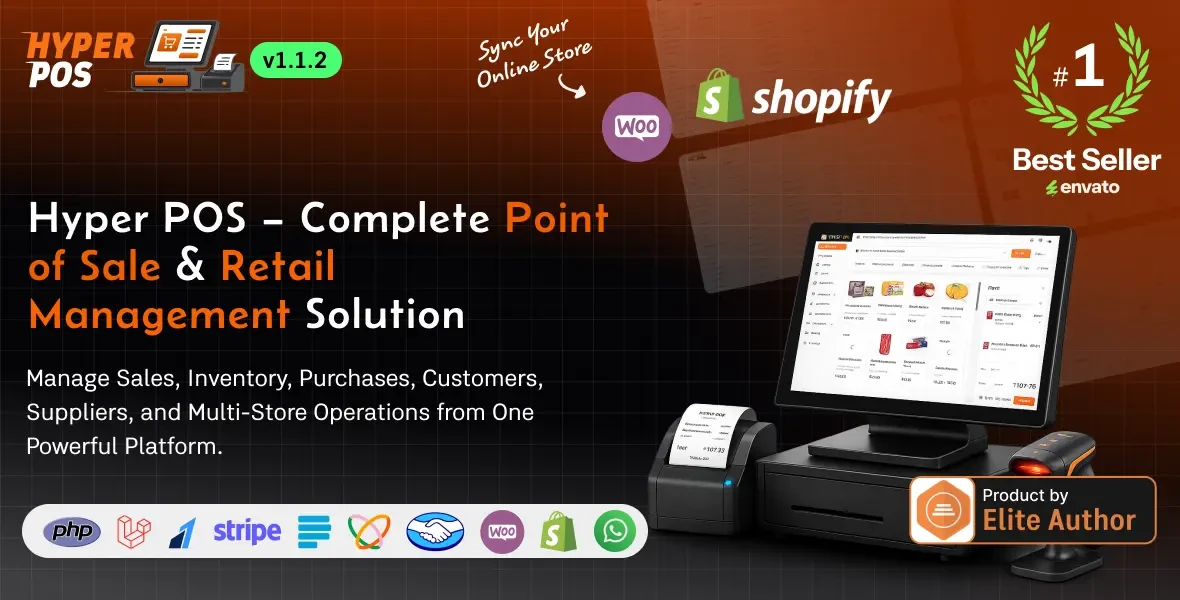
Proven products our customers install, customize, reskin, and publish alongside Hyper POS - Laravel Point of Sale, Inventory, ERP, Online & Offline POS, Invoicing, Accounting.


Modern Problem's, Modern Solution! Don't get stuck in those traditional, outdated, half baked products and stop yourself from wasting precious time and energy. Just explore once our product, you won't regret your decision.
It's built for real shops: Retail stores, supermarkets and grocery businesses, and pharmacies. Whether you're selling clothing, electronics, fresh produce by weight, or medicines with expiry dates, the system adapts to the way you work. No complicated setup, no monthly subscription traps — you install it on your own server and it's yours.
From the very first sale to the end-of-day report, everything just works. Scan a product, take the payment, hand over the receipt — done in seconds. Behind the scenes, your stock updates automatically, your sales are recorded, and your reports build themselves.
This is a complete business management solution that grows with you, whether you run a single counter or several stores across different locations. Explore more about our product below:

|

|

|

|

|








email : admin@gmail.com
Password : 12345678
email : cashier@demo.test
Password : cashier1234
1. Admin / Business Owner's Panel
2. Managers / Cashiers
Running a shop is hard work. Between ringing up customers, keeping shelves stocked, chasing payments, and trying to understand whether you actually made a profit this month, there's barely time to breathe. This Point of Sale (POS) and business management system brings every part of your daily operation into one clean, easy-to-use place — so you spend less time on paperwork and more time growing your business.
There are many POS scripts out there, so why this one? Because it was designed around the people who actually use it — busy shop owners and their staff — not around technical buzzwords.
In short: it's powerful enough to run a serious business, simple enough that your staff can start using it on day one.
Here's everything you get, explained in plain language.
The heart of the system. Scan barcodes, search products instantly, add items to the cart, apply discounts, and take payment in seconds. The checkout feels instant — even on modest hardware — so lines move quickly and customers stay happy.
Lost your internet connection? No problem. Sales continue as normal, safely stored on the device, and sync back to your records the moment you're online again. This keeps your shop running through outages, weak connections, and busy rush hours.
Always know exactly what you have. Track stock across multiple stores, get low-stock alerts before you run out, transfer items between locations, and run stock takes (cycle counts) to keep your numbers honest. Stock updates automatically with every sale, purchase, and return.
Manage unlimited products with categories, brands, units, barcodes, images, and pricing. Handle items sold by weight (perfect for grocery and supermarket businesses), products with variations, and even scan-friendly scale barcodes.
Track medicines (or any perishable goods) by batch and expiry date. The system automatically sells the oldest stock first and can block the sale of expired items — helping you stay compliant and avoid costly waste.
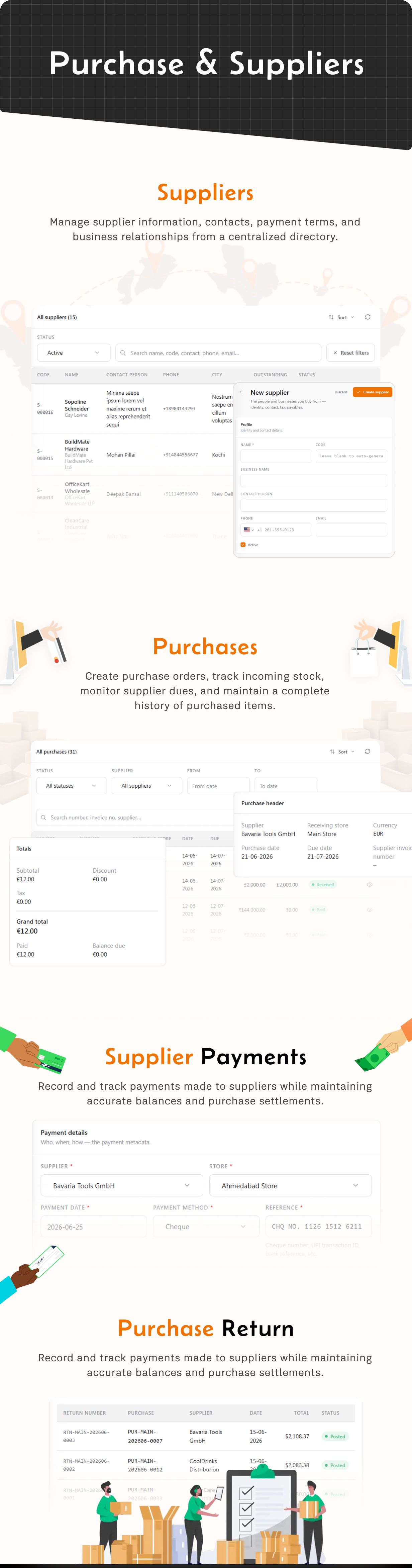
Create purchase orders, receive stock, manage supplier records, and track what you owe. Record supplier payments, handle purchase returns, and let the system update your costs and stock automatically.
Every sale, return, refund, and held order is recorded and easy to find. Look up any past transaction, reprint a receipt, or process a return in just a few clicks.
Build a loyal customer base. Save customer details, allow credit sales, track outstanding balances, and manage store credit like a simple wallet. Customers can pay over time, and you always know who owes what.
Accept cash, cards, and popular online payment gateways. Split a single bill across more than one payment method, and let customers pay by scanning a QR code at the counter. Multiple international payment providers are supported out of the box.
Apply discounts at the item or cart level, set up flexible tax rules that match your local laws, and print clean, professional receipts. Receipts can include your logo and a scannable barcode.
This POS and business management system gives small and growing businesses the same kind of powerful tools that big retail chains rely on — but in a simple, affordable, self-hosted package you fully own.
It handles the hard parts for you: fast checkout, accurate inventory management, smart order management, flexible payments, customer wallets and credit, multi-store control, and reliable reporting — all wrapped in a clean, professional interface that works beautifully in any language, light or dark, online or offline.
If you want to spend less time fighting with spreadsheets and more time serving customers and growing your shop, this is the system you've been looking for.
Get it once. Own it forever. Run your business with confidence.
====================
What's New
====================
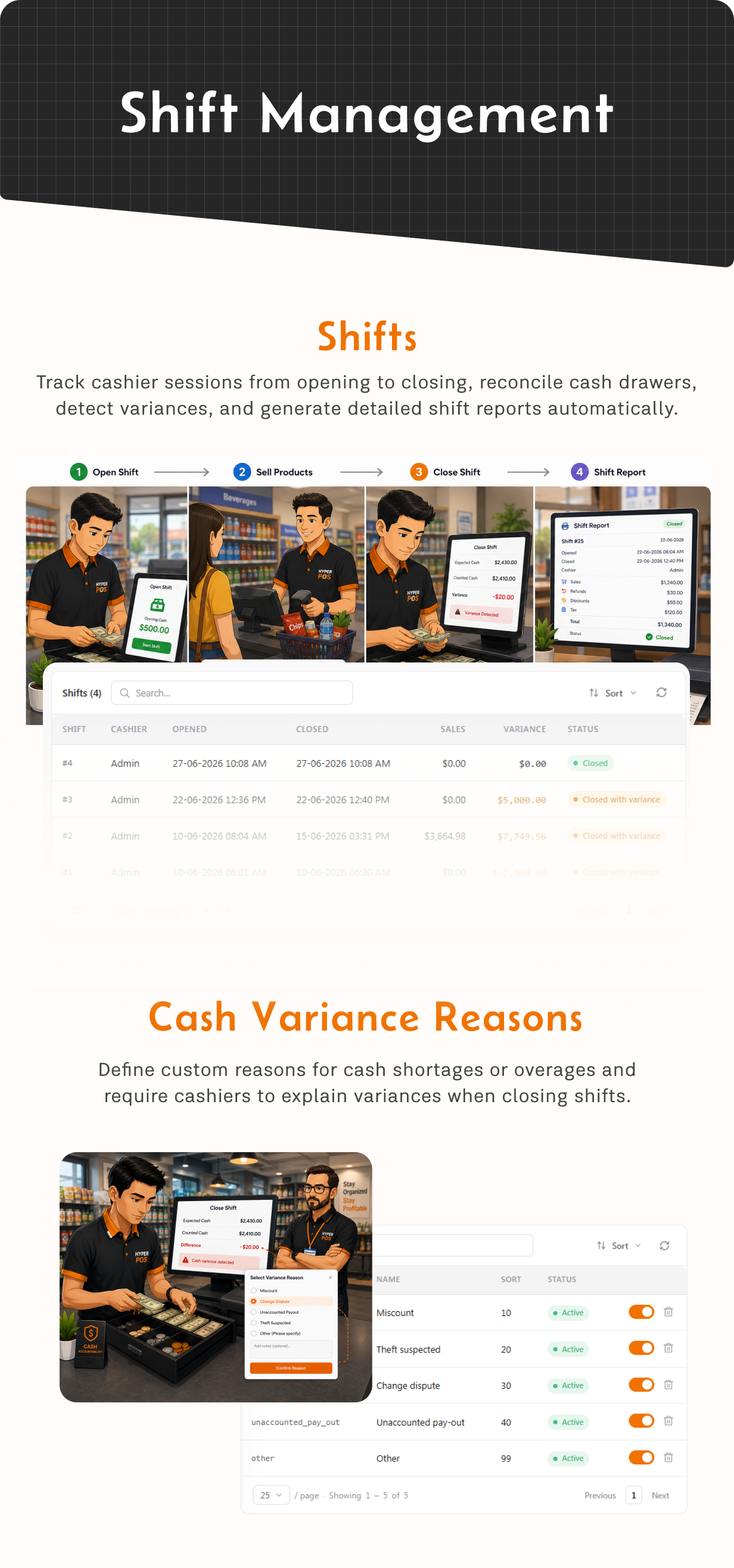
+ [Added] Terminal details in shift records — terminal names and codes now appear in shift lists, shift details, the Shifts by Cashier report and spreadsheet exports
+ [Improved] Shift and terminal safety — each user can hold only one open shift across the installation, each account can reserve only one terminal at a time, and closing a shift reliably releases its terminal
+ [Improved] Role-aware cashier access — authorized administrators can open the POS without reserving a terminal, while regular cashiers must still select an available terminal before working
+ [Improved] Barcode and label printing — added proper barcode quiet zones, sharper bar rendering and more stable sizing and padding for small thermal roll labels
+ [Fixed] Resuming a held sale now restores its tax group, rate and inclusive-tax details so the cart displays the correct totals before checkout
+ [Fixed] Other small issues and improvements
====================
What's New
====================
+ [Added] Full active ISO 4217 currency coverage — choose from supported country and territory currencies, including Moroccan Dirham (MAD), with localized currency names and the correct decimal precision
+ [Added] Cashier terminal reservations — a terminal already in use is kept unavailable to other sessions, reducing overlapping shifts and conflicting terminal activity
+ [Improved] Supplier advances are automatically applied as supplier credit when eligible purchases are received, with clearer payment history, statements and accounting safeguards
+ [Improved] Shopify synchronization now accepts customer identifiers from both webhooks and GraphQL, and recognizes read access already granted through matching write scopes
+ [Improved] Cashier stock availability refreshes after a completed sale, and phone inputs use the configured default country more consistently
+ [Fixed] Other small issues and improvements
====================
What's New
====================
[Added] License management — activate or recover an installation and de-register its current domain from Settings → License, with administrator confirmation before release
[Improved] Batch pricing and stock handling across sales, purchases, adjustments and transfers, including clearer validation and more consistent batch details in stock reports and exports
[Improved] Kiosk checkout now uses server-calculated prices and batch reservations for more reliable stock availability and order placement
[Fixed] Store-credit accounting and customer payment allocation, including repair support for affected accounting entries
[Fixed] UPI payment requests now use the selected store correctly, and customer-display QR codes resolve payment details from the active server-side payment request
[Fixed] Product exports now include usable links for uploaded images; importing the same file back avoids unnecessary image downloads
====================
What's New
====================
[Added] Store credit at checkout — customer overpayments can become reusable credit, and cashiers can apply all or part of the available balance to a future sale
[Added] Batch-wise pricing — optionally keep a separate cost, selling price and MRP for each batch, with safe fallback values for existing stock
[Added] Batch-aware inventory workflows — batch pricing and MRP now carry through purchases, stock adjustments and store transfers, with batch breakdowns in Available Stock and exports
[Added] WhatsApp document sharing — send sale receipts, quotations, credit notes, customer statements and customer or supplier payment vouchers through free Click-to-Chat or Meta Cloud API
[Added] WhatsApp connection management — configure a company default or store-specific connection, test credentials and messages, map approved templates, track delivery status and retry failed sends
[Added] Custom payment methods — create offline, record-only tender types for options such as Mobile Money, with a required customer-provided reference and no gateway integration
[Improved] Accounting entries now handle customer overpayments, store-credit use, supplier advances, cash-drawer movements and delayed posting more accurately, with repair support for affected legacy balances
[Improved] The sidebar is shorter and easier to scan, with setup and report pages grouped more clearly while every permitted page remains available through Ctrl+K search
[Improved] Batch selection, stock validation, customer statements, product code validation, number formats and spreadsheet exports now handle more edge cases safely
[Fixed] Other small issues and improvements
====================
What's New
====================
[Added] Shopify and WooCommerce integration — connect multiple online stores at the same time and manage each connection from Hyper POS
[Added] Two-way commerce workflows — send products, variants, categories, brands, images, customers and available stock online, then bring paid channel orders back into POS
[Added] Channel order allocation and fulfilment — reserve and split online orders across POS stores, update fulfilment back to Shopify or WooCommerce, and mirror cancellations and refunds
[Added] Quotations — prepare priced offers for existing customers or prospects without reserving stock, then track draft, sent, accepted, declined, expired and cancelled states
[Added] Shareable quotation documents — send a secure customer link, record views and responses, create revisions, print or download a PDF, and convert an accepted quotation into a sale
[Added] Customer import — upload CSV or Excel files with a preview, validation and safe matching of existing customers
[Added] Inventory imports — create stock adjustments and enter stock-take counts from CSV or Excel files using SKU or barcode matching
[Added] Bulk product deletion — remove selected unused products together while automatically protecting products that have sales history
[Added] Product images and brand logos from URLs — import links from a spreadsheet or paste them in bulk, preview matches, and fetch them safely in manageable batches
[Added] Custom scripts settings — add trusted header or footer snippets for analytics, chat and other integrations, with password confirmation and protected system pages excluded
[Added] Security settings — optionally limit each user to one active session, and require confirmation before an account email address changes
[Improved] Commerce synchronization now uses durable retry queues and signature-verified, deduplicated webhooks, so provider outages do not roll back POS sales or stock movements
[Improved] Scheduled backups and other daily tasks now run in the store timezone, catch up after a missed window, prevent overlapping runs and record each run
[Improved] Stock movement references now link directly to their source sale, purchase, return, transfer, adjustment or expense
[Improved] Large list exports now stream in batches for lower memory use and better reliability on shared hosting
[Improved] Accounting posting now guards against duplicate entries and records failures for safe recovery
[Improved] Backup and restore validation, updater archives, payment webhooks, legal-page content and remote image downloads received additional security checks
[Improved] Store access, report permissions, inactive-user sessions, product variant stock integrity and offline customer synchronization are enforced more consistently
[Fixed] Partial and tax-inclusive refund totals now use the original sale amounts correctly, including refunds applied against a customer's balance
[Fixed] Purchase returns, supplier payments, stock transfers, kiosk orders, customer statements, tax calculations and customer-display updates now handle edge cases more reliably
[Fixed] Other small issues and improvements
====================
What's New
====================
[Added] Shelf locations — record where a product sits (aisle, rack, shelf, bin) at each store, with as many locations per product as you keep it in: pick face, godown, fridge, locked cabinet
[Added] Shelf location on the cashier screen — tap it on a product tile to see every place that item is kept, without leaving the cart
[Added] Shelf location across inventory — stock levels, low stock, batches, transfers, stock takes, exports, and as an optional field on printed labels
[Added] Assign shelf locations in bulk from the products list, across every product matching your filters — not just the visible page. Also imports from CSV, and the field names are yours to rename or switch off in Settings
[Added] Printable stock count sheet — grouped by shelf location in walk order, with a blind option that hides expected quantities so the count is honest
[Added] Cash in / cash out from the till screen — record a float top-up or a pay-out without leaving the cashier, and book a pay-out as an expense in one step
[Added] Cash expenses now move the drawer — a cash expense in the back office creates the matching pay-out, and editing or deleting it reverses cleanly
[Added] Retry a failed offline sync — replay a sale that failed to sync straight from the sync log, or mark it resolved
[Improved] Deactivating a user takes effect immediately, ending any session they already have open
[Improved] Tighter store boundaries — lists, reports, exports and scheduled reports only ever show data from the stores a user is assigned to
[Improved] Users can no longer grant themselves permissions they don't have, or lock out the last administrator
[Improved] More accurate profit reporting — every sale line now stores the cost it sold at, with a tool to fill in past sales
[Fixed] Other small issues and improvements
====================
What's New
====================
[Added] Customer loyalty points — reward regulars with points on every purchase and let them redeem points as a discount at the till, with automatic expiry
[Added] Unified contacts view — see and manage your customers and suppliers together, so everyone you do business with is in one place
[Added] Dedicated Sales page — create and manage a sale from the back office, separate from the cashier screen
[Added] Automatic product codes — leave a product's SKU blank and the system generates one for you in your chosen format
[Added] One-tap barcodes for non-standard items — generate a valid in-store barcode for loose, bulk or own-made products that don't come with one
[Added] Automatic batch selection — the system picks the right batch for you: soonest-to-expire first for items with expiry dates (FEFO), and oldest stock first for everything else (FIFO)
[Added] Bulk import for brands — build your whole brand list from a CSV or Excel file, logos included
[Improved] Kiosk cart now shows full product details — variant choices (such as size and colour) and the items inside a kit are listed on each line
[Fixed] Other small issues and improvements
====================
What's New
====================
[Added] Bulk product upload now brings images with it — drop a folder of photos and they attach to the right products
[Added] Bulk upload for categories — build your whole category tree from a CSV or Excel file
[Added] Barcode scanning across inventory — stock adjustments, transfers, stock reconciliation and purchase orders all scan just like the cashier screen
[Added] Pay suppliers straight from the till — settle unpaid invoices in full or part during an open shift
[Added] Allow negative stock — opt in to keep selling when stock hits zero, permission-gated per user
[Added] Delete product batches you no longer need
[Added] Kit prices now build themselves from the products inside the kit, with a Recalculate button
[Added] Full-credit sales at the POS — ring up an order entirely on a customer's account
[Added] UPI pay button on the customer-facing display, so the shopper can scan and pay from their own screen
[Added] One-tap Kiosk launch button, right where staff need it
[Added] Purchase orders now show selling price and MRP alongside cost while you build the order
[Improved] Redesigned sidebar menu — faster to scan, easier to navigate
[Improved] Kiosk order list now shows the complete order, not just a summary
[Fixed] Other small issues and improvements
====================
What's New
====================
[Added] Kiosk mode — let customers browse, cart and order themselves on a spare terminal
[Added] Kiosk pay-at-terminal — customer scans a QR to pay, receipt QR printed on completion
[Added] Kiosk order queue — self-placed orders land in a live queue for staff to fulfil
[Added] Kiosk works offline — orders placed with no internet sync automatically when it returns
[Added] Customer-facing display — a second screen that mirrors the cart for the shopper
[Added] Public receipt links — share a receipt by link or QR, no login needed to view it
[Added] Scheduled Reports — email any saved report on a daily, weekly or monthly schedule
[Added] Accounting — chart of accounts, journal, daybook, P&L, balance sheet, cash flow, trial balance
[Added] Accounting posts automatically from sales, returns, refunds, purchases, payments and expenses
[Added] Period lock and year-end close to protect closed books
[Added] Setup checklist on the dashboard to guide new installs
[Fixed] Other small issues and improvements
====================
What's New
====================
[Added] Reports section with 10 reports (Sales by Product, Cashier, Category, Payment Method, Top Customers, Top Suppliers, Shifts, Discounts, Aged Receivables, Sales Summary)
[Added] Quick date-range presets on reports (Today, This Month, Last 7 Days, Custom, etc.)
[Added] PDF export for reports (plus existing Excel & CSV)
[Added] Saved Reports — save filters and reopen in one click
[Added] New Expense module — record and manage store expenses with categories
[Added] Automatic gateway refunds — card/online refunds reverse at the gateway (Stripe, Razorpay, Paystack, Flutterwave, Mercado Pago)
[Improved] Products page opens in grid view and loads more items as you scroll
[Improved] Refund screen — cash/bank transfer always available; gateway refunds limited to the gateway used
[Improved] Faster and more reliable app updates
[Improved] Dark mode and RTL support on all new screens
[Fixed] Other small issues and improvements


